Market Monitor is a modular data pipeline that continuously collects product, offer, and pricing information across multiple marketplaces. It’s built for real-world constraints: large catalogs (170k+ products per marketplace), strict API rate limits, long-running jobs, and the need to keep dashboards usable while fresh data is still being ingested.
The key idea is atomic staging: each scan writes into staging tables first, then promotes the completed result into production in one step. That way, reporting and downstream processes always see a consistent dataset—either the previous scan or the new one—never a partially-updated mix.
TL;DR
- Built a multi-marketplace ingestion pipeline that stays consistent during hours-long scans
- Uses staging tables + atomic promotion so production data is never partially updated
- Includes scan tracking, progress monitoring, rate limiting, and post-scan validation
What it does
- Scans marketplaces via official APIs (and targeted scraping where needed)
- Normalizes data into a single PostgreSQL schema
- Tracks scan runs (start/end/fail), error counts, and quality metrics
- Uses concurrency + rate limiting to scale without getting blocked
- Promotes staging → production atomically per marketplace
Why it’s interesting
Most “API integration” projects work fine at small scale. This one is designed for scale and reliability:
- Long-running scans with resumable, observable progress
- Process locking to prevent overlapping runs
- Validation and post-scan analysis to catch data regressions
Problem & constraints
The system needed to answer a simple business question (“what’s happening to our prices and offers across marketplaces?”) under hard engineering constraints:
- Huge catalog sizes (170k+ products per marketplace)
- Rate limits and intermittent API/network failures
- Long-running jobs (minutes to hours) that must not break reporting
- Different data shapes per marketplace (identifiers, offer models, inventory, shipping)
Key design decisions
- Atomic staging per marketplace: writes go to staging tables; promotion swaps in a complete snapshot.
- Marketplace isolation: each marketplace has its own client + processor, but shares the same pipeline contract.
- Scan tracking: every run records start/end/fail + outcome metrics so you can trend reliability over time.
- Progress + observability: periodic progress reporting for long scans (useful when running via automation).
- Safety controls: process locking prevents overlapping scans for the same job.
Tech Stack
| Domain | Tools & Libraries |
|---|---|
| Core Logic | Python 3.11+, Pandas (Dataframes), Threading (Concurrency) |
| Data Persistence | PostgreSQL, SQLAlchemy (ORM), Alembic |
| Integration | python-sp-api (Amazon), Custom REST Clients (Kaufland/Galaxus) |
| Scraping | SeleniumBase (Headless Browser), BeautifulSoup4 (HTML Parsing) |
| Infrastructure | n8n (Workflow Orchestration), Linux (Ubuntu), Redis (Locking) |
Production setup
This isn’t a demo project — it’s running in production for a client.
- Deployed on a self-hosted n8n instance on a Linux server
- I maintain the server environment (updates, Python installation, dependencies)
- Scans run on schedules and can be monitored via run logs + scan tracking records
Automation & AI enrichment
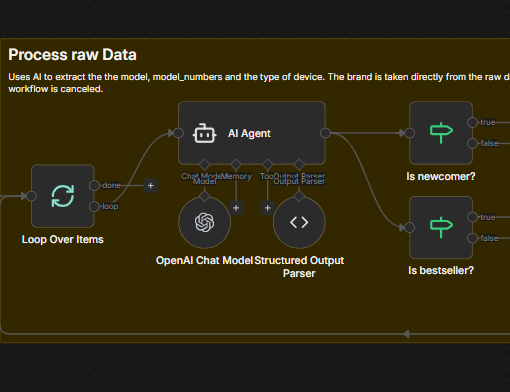
In addition to raw monitoring, some feeds are enriched through AI workflows in n8n:
- Amazon bestsellers / newcomers and Schutzfolie24 newcomers are ingested as “trend signals”
- An AI step extracts structured attributes from noisy product metadata (e.g., model name, model numbers, device type)
- The workflows are designed to return strict JSON so downstream steps stay deterministic
Architecture overview
The pipeline is designed for fault tolerance. If a scan fails 90% of the way through, the bad data is discarded and production remains untouched (Atomic Staging).
graph TD
    Trigger[n8n Scheduler] -->|Start| Scanner[Python Scanner]
    Scanner -->|Fetch| API[Marketplace API]
    API -->|Data| Scanner
    Scanner -->|Write Batch| Staging[(Staging DB)]
    Staging -->|Validate| Checks{Post-Scan Checks}
    Checks -- Pass --> Swap[Atomic Promotion]
    Checks -- Fail --> Alert[Error Notification]
    Swap -->|Replace| Production[(Production DB)]
Scan Process Sequence
The entire process simulates a transactional update on a massive scale.
sequenceDiagram
    participant S as n8n Scheduler
    participant P as Python Scanner
    participant M as Marketplace API
    participant DB as Postgres DB (Staging)
    participant PROD as Postgres DB (Prod)

    S->>P: Trigger Scan (Cron)
    activate P
    P->>P: Acquire Process Lock (Redis/File)

    loop Concurrent Batch Processing
        P->>M: Fetch Inventory/Offers (w/ Rate Limit)
        M-->>P: Raw Data
        P->>P: Normalize & Enrich
        P->>DB: Bulk Insert (Staging)
    end

    P->>DB: Run Integrity Checks (Counts, Missing Items)

    alt Integrity Pass
        rect rgb(23, 42, 23)
            note over P, PROD: Atomic Promotion Phase
            P->>PROD: Begin Transaction
            P->>PROD: Swap Staging -> Active Schema
            P->>PROD: Commit
        end
        P-->>S: Report Success (Metrics)
    else Integrity Fail
        P->>DB: Rollback / Discard Staging
        P-->>S: Alert Failure
    end

    deactivate P
Data model (conceptual)
Normalization is critical here. While Amazon gives us ASINs and Kaufland gives us EANs, the database maps everything to a unified product entity to allow cross-marketplace price comparison.
erDiagram
    Product ||--o{ Offer : "has many"
    Product ||--o{ Identifier : "has many"
    ScanRun ||--o{ Offer : "generated"

    Product {
        string uuid PK
        string title
        string primary_image
    }

    Identifier {
        string type "GTIN/EAN/ASIN"
        string value
    }

    Offer {
        float price
        string seller_name
        bool is_competitor
        int delivery_days
    }

    ScanRun {
        int id PK
        timestamp start_time
        string status
        int error_count
    }
Marketplaces (modules)
I present this as one project with multiple modules to highlight different engineering challenges: Scale (Monitoring) and Intelligence (Trend Detection).
1. Core Price Monitoring (Amazon, Kaufland, Galaxus)
Focus: High throughput, reliability, and data consistency.
These modules monitor the client’s massive catalog (170k+ items) to track price changes and competitor offers.
- Amazon Monitor: Uses the official SP-API to scan own and competitor listings. Matches products via GTIN/EAN to ensure catalog consistency.
- Kaufland Monitor: Handles multi-account management (ZenGlass, Dipos) within a single scan cycle. Uses aggressive threading (60+ workers) to handle the volume within acceptable windows.
- Galaxus Monitor: Marketplace-aware scanning (DE/CH) with strict process locking to prevent overlapping jobs.
Key constraint handled: Atomic staging ensures that even if a scan takes 2 hours, the pricing dashboard never shows a mix of “old” and “new” data.
2. AI-Powered Trend Detection (Schutzfolie24, Amazon Newcomers)
Focus: Unstructured data extraction and automation.
The client uses these modules to spot new devices (e.g., a new “iPhone 17”) immediately after they appear on competitor sites or bestseller lists.
- The Flow:
- Scraper (Python): Collects raw “New Arrivals” or “Bestsellers” data (titles, images, unstructured text).
- n8n Workflow: Passes raw data to an AI agent with a strict system prompt.
- AI Extraction: Extracts structured JSON fields (
model,model_numbers,device_type) from messy inputs like “Samsung Galaxy S25 Ultra 5G…”. - Action: Auto-tags products in the database.
Example AI Prompt Strategy: The AI is instructed to return strict JSON only, filtering complex titles into standardized types (e.g., “Smartphone”, “Tablet”) and normalizing model names.
// The AI enforces this structure for every product detected
{
  "model": "iPhone 17 Pro",
  "model_numbers": "MG8J4ZD/A, B0FQG15YVP",
  "device_type": "Smartphone" // Enum: [Smartphone, Tablet, Smartwatch...]
}
This allows the client to auto-filter “new smartphones” without manual data entry.
3. Inventory Tooling (eBay)
- eBay Inventory: Handles bulk export and parsing of large XML seller lists (260k+ items) to audit listing status and shipping costs across international sites.
Engineering Highlights
One thing I learned is that “scripts” aren’t enough—you need systems.
1. Self-Healing Process Locks
To prevent a cron job from piling up 100 scanner instances if one hangs, I implemented a file-based lock that checks for stale PIDs.
- The problem: If a script crashes hard, the
lock.release()infinally:might not run, leaving a “zombie” lock file that blocks all future runs. - The fix: The lock checker reads the PID from the file and queries the OS (via
os.killon Linux orctypeson Windows) to see if that process actually exists. If not, it self-heals by overriding the stale lock.
2. “Good Citizen” CLI Design for n8n
Since this runs in a workflow engine (n8n), the CLI behavior had to be strictly managed:
- Exit Codes: Uses semantic exit codes (0=Success, 1=Error, 2=Locked/Skipped) so the workflow can branch logic correctly.
- Stream Redirection: Python loggers often hijack
stderr. I explicitly preserve the originalstderrfile descriptor to ensure critical infrastructure errors (like lock failures) bubble up to the n8n dashboard immediately, bypassing the internal application log.
3. Debugging the “Unscrapable”
For the scraping modules (Schutzfolie24), transient failures are common.
- I implemented a
save_debug_htmltrigger: if a text parser fails or a CSRF token is missing, the script dumps the exact HTML payload it received to a timestamped file. - This allowed me to debug obscure issues (like anti-bot challenges or layout A/B tests) that you can never reproduce locally.
4. Smart Caching & Thread-Safe Round Robin
To minimize API costs and latency, I built a multi-layered lookup strategy for Amazon catalog data:
- Optimization: Before hitting the API, it checks a local Postgres cache (valid for 30 days) for GTIN-to-ASIN mappings.
- Round-Robin API Clients: The scanner rotates through multiple API clients (ZenGlass, Dipos) using thread-safe locks (
threading.Lock) to distribute load and avoid hitting per-account rate limits. - Batching & Retry Logic: The
GTINProcessorautomatically batches lookups (20 items/chunk) and implements a smart “second pass” retry for any batches that fail due to transient network issues.
Performance
- Concurrency is used where safe (thread pools for IO-bound fetches)
- The DB write path is optimized around staging to reduce lock contention
- Long scans remain observable with periodic progress logs
Results (Production Metrics)
- Catalog Scale: Handled ~170k+ products per marketplace (Kaufland DE) and ~260k+ inventory items (eBay).
- Scan Durations:
- Kaufland: ~25 minutes for 170k items (Active Concurrency: 60 threads).
- Galaxus: ~5.7 hours (DE) to ~13 hours (CH) (throttled to respect strict anti-bot rate limits).
- Trend Scrapers: ~12 minutes end-to-end for daily newcomer detection.
- Throughput: Peaking at ~6,800 items/min on high-concurrency modules (Kaufland).
- Reliability: Zero system failures in the last 30 days (100% success rate for scheduled runs), utilizing self-healing locks and automatic retries.
What I’d improve next
- Add a small web UI for scan history + anomaly charts
- Add idempotent “resume from last successful page” for specific marketplaces
- Centralize a shared validation suite across all marketplace modules