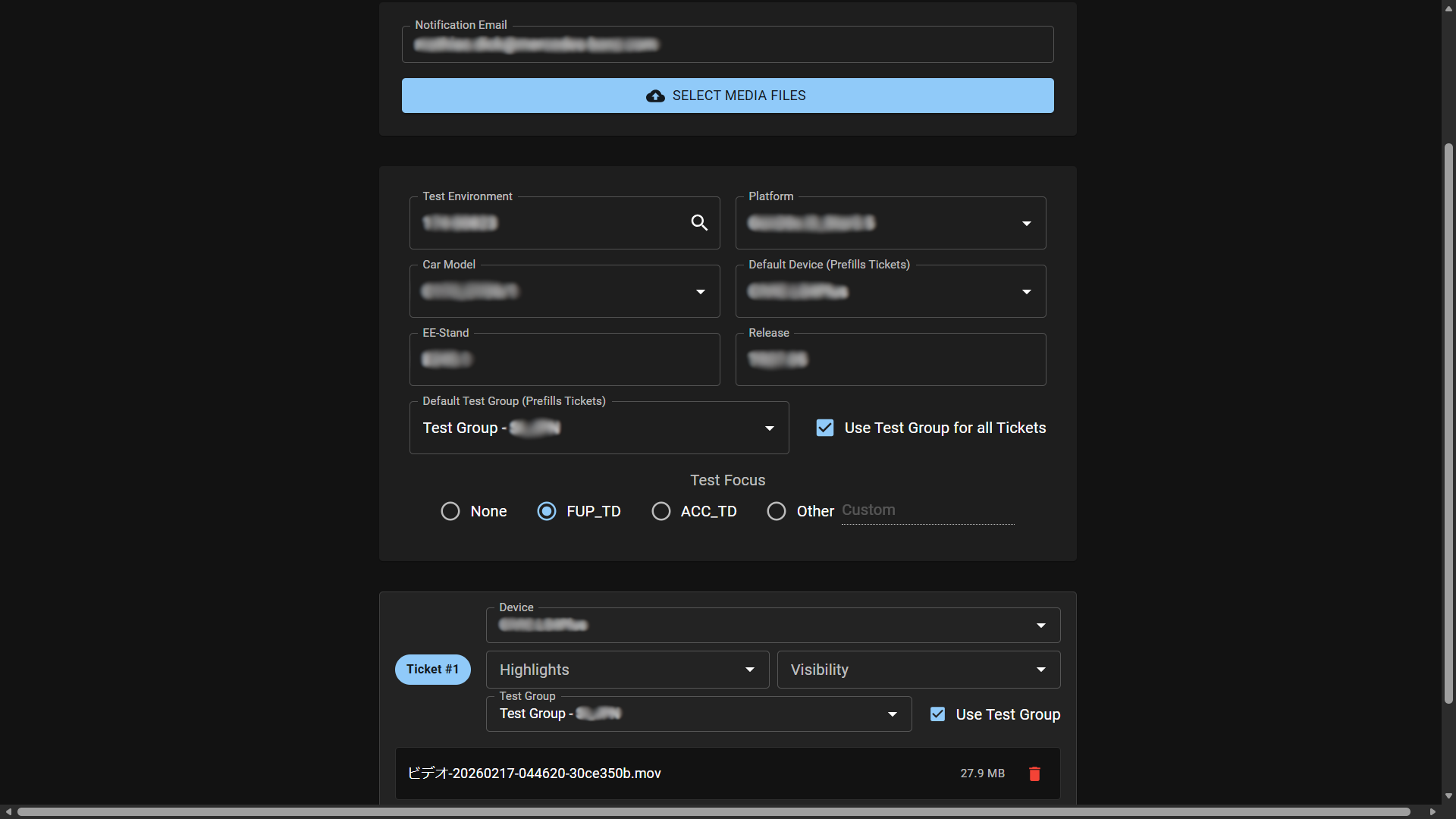
AI Ticketing Assistant is a specialized desktop application developed to streamline the defect reporting process for automotive validation teams. It automates the tedious task of manually filling out ticket fields by “listening” to voice notes from test drivers and engineers.
Problem
Test engineers often record voice notes or take videos while driving or testing infotainment systems to remember the specific Trigger numbers needed for cutting the traces and uploading tickets with the correct logs. Creating those tickets can take a lot of time because users need to:
- Watch the video to recall the fault and extract the Triggers.
- Write the error description.
- Look up vehicle metadata (vehicle data, software version, hardware variant).
- Categorize the defect (System, Defect Area, Frequency).
- Attach the correct evidence files.
This manual process is slow and prone to data entry errors. Furthermore, duplicate errors might be uploaded without the user’s knowledge, leading to extra triage work for the developers who have to sort and close them.
Solution
Since most users capture video evidence anyway, this tool leverages that media to save time and increase ticket accuracy (as the user can dictate details while the error is fresh in their memory). The AI Ticketing Assistant allows engineers to simply drag and drop their video or audio evidence into a dashboard and specify which car they were driving. The system automatically:
- Transcribes the voice commentary using a local Whisper model.
- Extracts structured data (Preconditions, Error Path, Misbehavior, Error Correction, Occurrence, Defect Area, System) using GPT-4o.
- Matches the test vehicle with internal fleet databases to auto-fill Vehicle and Software Configurations.
- Generates ready-to-import ticket files (
.jtds,.json) and formatted email reports with duplicate analysis to prevent uploading the same error.
Tech Stack
| Domain | Technologies |
|---|---|
| Frontend | React, Vite, Material UI, React Window (Virtualization) |
| Backend | Python, Flask, Waitress (Production WSGI) |
| AI (Speech) | OpenAI Whisper (Local “Turbo” model) |
| AI (Logic) | Azure OpenAI (GPT-4o) |
| Media | FFmpeg, MoviePy (Audio extraction) |
| Packaging | PyInstaller (Single-file exe distribution) |
Key Features
1. Hybrid AI Architecture & RAG
To balance privacy, cost, and speed, the application uses a hybrid approach:
- Local Processing: High-bandwidth audio transcription happens on-device using a quantized Whisper Turbo model. This avoids uploading large video files to the cloud.
- Cloud Intelligence: The text transcript is sent to Azure OpenAI (GPT-4o) for structuring.
- Duplicate Detection (RAG): The system implements Retrieval-Augmented Generation to prevent duplicate tickets. It vectorizes thousands of existing defects (fetched from the internal STARC system API) using
text-embedding-ada-002and checks for semantic similarities before a new ticket is created. Afterward, the mathematically calculated matches are double-checked with GPT-4o to ensure they align with the actual new error description.
2. Advanced Prompt Engineering
The system relies on sophisticated system prompts (stored as text assets) to guide the AI’s reasoning:
- Language Standardization: The application enforces a strict “English Only” rule. If a test driver records a voice note in German or Mandarin, the AI automatically translates and standardizes the technical terminology into English for the official ticket.
- Causality Analysis: The AI is explicitly prompted to distinguish between symptoms and root causes. For example, if “Navigation freezes when Bluetooth connects,” the system is instructed to assign the defect to the Bluetooth team (the trigger), not the Navigation team (the victim), reducing ticket bouncing between departments.
3. Deep Knowledge Integration
The system is built to strictly adhere to corporate taxonomy.
- Auto-Updates: It ingests massive configuration files (e.g., an 800,000+ line
DefectArea.json) and parses internal “Vehicle List” Excel sheets to map a unified “Test-Environment” Car identifier (e.g., “174-1234”) to specific technical details like Carline, Headunit Device, and Hardware Version. - Self-Maintenance: Background workers automatically detect changes in Excel vehicle lists and regenerate the internal CSV databases, ensuring the tool is always in sync with the latest test fleet. The taxonomy files are automatically regenerated every 24 hours using the STARC API.
4. Robust Media Handling
Handling video from various test devices (GoPro, iPhone, Dashcam) is notoriously difficult due to codec variations.
- Primary: Uses
MoviePyfor standard containers. - Fallback: Implements a direct
FFmpegsubprocess fallback to handle complex streams (like Apple’s ProRes or multi-track audio) that often break Python wrappers.
5. Enterprise-Ready Dashboard
The React frontend is built for power users:
- Drag-and-Drop Grouping: Users can add files and group them into distinct tickets visually.
- Virtualization: Uses
react-windowto handle bulk uploads of many files without lagging the UI. - Rich Reporting: Generates HTML email reports using Jinja2 templates, embedding Ticket Information and Duplicate Information directly in the notification so engineers can catch duplicates before even logging into the ticketing system.
- Local Persistence: Remembers user preferences (Dark Mode, previously added car data) via local storage.
6. Self-Healing & Maintenance
One of the biggest risks for internal tools is “bit rot” when APIs change or reference data becomes stale.
- Automated Data Pipeline: A scheduled background update job connects to the corporate STARC API to fetch the latest schemas, User IDs, and Platform definitions (e.g.,
NTG7vsC174). - Vector Database Refresh: As new bugs are reported by other teams across the world, the application automatically indexes their embeddings overnight. This means “Duplicate Detection” and Defect Area retrieval gets smarter every day without code changes.
7. Operational Reliability & Privacy
- Reliable Processing Path: The backend protects Whisper inference with thread locking and uses a resilient media pipeline (
MoviePyfirst,FFmpegfallback) to reduce failures in real-world uploads. - Controlled API Usage: Embedding updates use rate-limited parallel workers with checkpoint saves to keep long-running sync jobs stable.
- Privacy-Aware Design: Audio/video stays local for preprocessing and transcription; only the transcription text is sent to cloud LLM services.
8. Adoption & Enablement
- Team Onboarding: I created an internal walkthrough presentation and tutorial material so coworkers can adopt the tool quickly and use it consistently. After a trial run, I received feedback and further feature requests that i implemented in order to maximize the usage of the tool by the employees.
Architecture
The drivers have two choices for deployment. Primarily, the application runs on a server within the corporate network, meaning it is unavailable from outside the premises. However, to enable duplicate detection during drives—or to assist with long-distance test drives where employees are off-site for multiple days—the application also runs as a self-contained local executable. This ensures confidential data doesn’t get uploaded to the public internet. When the user launches the .exe, it spins up a headless Flask/Waitress server and serves the React frontend (bundled as static assets) to the local browser.
graph TD
    User[Test Engineer] -->|Drag and Drop Files| UI[React Dashboard]
    UI -->|POST upload-bulk| Server[Flask Server]

    subgraph Upload Phase
        Server -->|4 parallel workers| Save[Save Files to Disk]
        Save --> BG[Background Worker]
    end

    subgraph Audio Extraction
        BG -->|Video file| MoviePy[MoviePy]
        MoviePy -->|Codec error| FFmpeg[FFmpeg Fallback]
        MoviePy -->|Success| Audio[MP3 Audio]
        FFmpeg --> Audio
        BG -->|Audio file| Audio
    end

    subgraph AI Pipeline
        Audio --> Whisper["Whisper Turbo - runs locally"]
        Whisper -->|Accumulated transcript| Structure["GPT-4o - Structure Ticket JSON"]
        Structure -->|title, description, BP, HU| RenameFiles[Rename Evidence Files]
        Structure --> EmbedQuery["Embed Query via ADA-002"]
        EmbedQuery -->|Cosine similarity search| PKL[(Platform Embeddings pkl)]
        PKL -->|Top 5 similar tickets| EvalAI["GPT-4o - Causality Evaluation"]
        EvalAI -->|defect_area, severity, priority| BuildTicket[Build Ticket Data]
        Structure --> FINAS[FINAS Vehicle Lookup]
        FINAS -->|carline, platform, release, EE-Version| BuildTicket
        RenameFiles -->|Attachment paths| BuildTicket
        BuildTicket --> ConfigJSON[(Project Config JSON)]
    end

    subgraph Output
        BuildTicket --> JTDS[Generate JTDS File]
        JTDS --> Email[Send HTML Email Report]
        Email -->|Delivered| User
    end

    VehicleCSV[(Vehicle List CSV)] --> FINAS
    FINAS -->|carline, EE-Version, platform, release| UI

    subgraph Scheduled Update Job
        UpdateScript[Update Script] -->|Authenticate| STARC[STARC API]
        STARC -->|Download taxonomy JSONs| ConfigJSON
        STARC -->|Fetch tickets via CBQL query| TicketCSV[(Ticket Database CSV)]
        TicketCSV -->|Embed with ADA-002 - incremental| PKL
        ExcelWatch[Vehicle List Excel Files] -->|File change detected| VehicleCSV
    end
Key Code Snippet: Optimized File Uploads & FFmpeg Fallback
Handling large video uploads (4K test footage) requires careful stream management to prevent memory overflows, and robust fallbacks for media processing.
def save_file_optimized(file_storage, save_path):
    """Save uploaded file with optimized buffering for faster I/O avoids MemoryErrors."""
    buffer_size = 16 * 1024 * 1024  # 16MB buffer
    with open(save_path, 'wb') as f:
        while True:
            chunk = file_storage.stream.read(buffer_size)
            if not chunk: break
            f.write(chunk)

def extract_audio(video_path, filename_base):
    """Robust audio extraction with fallback for complex codecs (e.g. iPhone HEVC)"""
    audio_path = os.path.join(app.config['AUDIO_FOLDER'], f"{filename_base}.mp3")

    try:
        # Fast path: Native Python wrapper
        video_clip = VideoFileClip(video_path)
        video_clip.audio.write_audiofile(audio_path, logger=None)
    except Exception as e:
        logger.warning(f"MoviePy failed for {filename_base}, engaging FFmpeg fallback...")

        # Robust path: Direct FFmpeg subprocess
        # -map 0:a:0 selects specifically the first audio track
        subprocess.run([
            'ffmpeg', '-i', video_path, '-vn',
            '-map', '0:a:0', '-acodec', 'libmp3lame',
            '-q:a', '2', '-y', audio_path
        ], check=True, timeout=300)

    return audio_path
Impact & Results
While internal metrics are confidential, the tool solved critical workflow bottlenecks:
- Eliminated Data Entry: Significantly reduced ticket creation time by automating transcription, structuring, evidence upload and metadata mapping.
- Standardized Quality: Enforced English-only, structured descriptions across global teams, removing language barriers.
- Reduced Noise: Proactively caught duplicate tickets via semantic search and AI enhancement before they entered the triage queue.
Challenges & Learnings
- PyInstaller & Whisper: Bundling the large Whisper model weights inside a single-file executable was challenging. I solved this by managing resource paths dynamically to permit the app to find weights whether running as a script or a frozen
.exe. - Thread Safety: The Whisper model is not inherently thread-safe. I implemented
threading.Lock()around the transcription inference to allow the Flask server to handle concurrent types of requests (uploads, status checks) without crashing the AI engine.